How to Identify and Safely Handle a Damaged Lithium-Ion Battery 

Lithium-ion batteries power mobile devices across healthcare, government, logistics, manufacturing, and field operations. But unlike the device itself, a battery is a consumable component. Every charge cycle, period of storage, temperature fluctuation, and year of use gradually affects battery health.

Because much of this degradation happens internally, an unhealthy battery may not immediately appear damaged. Recognizing the warning signs early and establishing proper battery inspection and replacement procedures can help organizations protect employees, equipment, and operational uptime.

What Causes Lithium-Ion Battery Damage?

Battery degradation is a normal part of the battery lifecycle, but several factors can accelerate the process:

  • Normal aging and charge cycles: Every lithium-ion battery has a finite useful lifecycle.
  • Physical damage: Drops, impacts, or damage to the casing can compromise internal components.
  • Temperature extremes: Prolonged exposure to excessive heat or cold can affect battery health and performance.
  • Improper storage: Batteries stored for extended periods under unfavorable environmental or charge conditions may degrade faster.
  • Charging practices: Keeping batteries fully charged for extended periods, allowing them to remain deeply discharged, or using incompatible charging equipment can create additional stress.
  • Manufacturing defects: Internal defects can occasionally result in premature battery failure.

For organizations managing fleets of rugged tablets and medical all-in-one computers, battery maintenance should be treated as part of overall device lifecycle management.

How to Identify a Damaged Battery

A battery showing physical abnormalities or unusual operating behavior should never be ignored.

Common warning signs include:

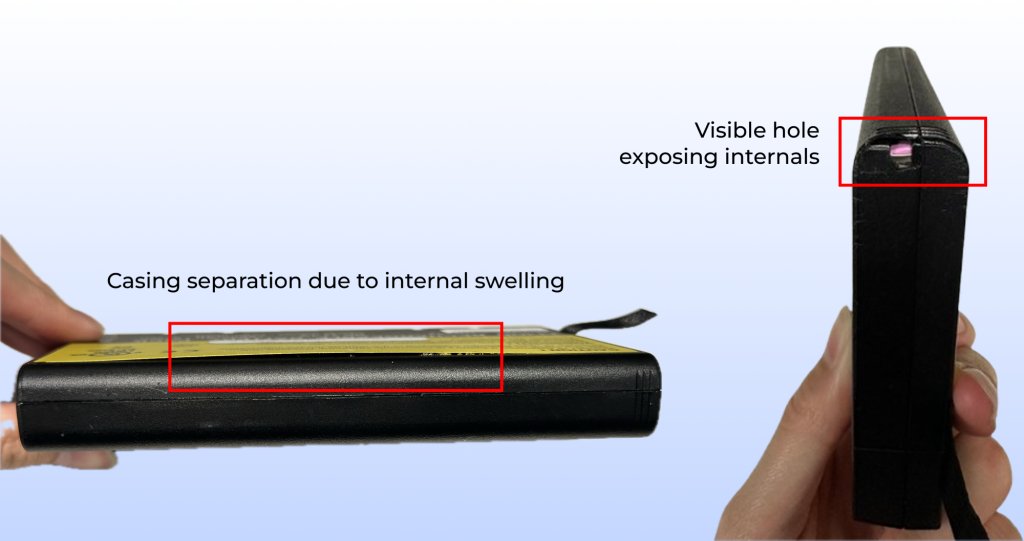
  • Swelling or bulging
  • Cracked or separated casing
  • Discoloration or corrosion
  • Leaking fluid
  • Unusual heat
  • Rapid battery drain
  • Unexpected device shutdowns
  • Erratic or unsuccessful charging
  • Unusual chemical or burning odors
  • Hissing or popping sounds

A swollen battery may push against the device enclosure or prevent the battery from sitting properly within its compartment. If any of these conditions occur, discontinue use and charging immediately.

How to Safely Handle a Damaged Battery

A battery that is swollen, leaking, overheating, cracked, or otherwise damaged should not be returned to normal operation.

When it is safe to do so:

  • Stop charging or using the battery immediately.
  • Disconnect the device from external power.
  • Keep the battery away from combustible materials, other batteries, metal objects, and direct sunlight.
  • Move people away if the battery is overheating, smoking, venting, or making unusual sounds.
  • Follow the device manufacturer’s battery handling and safety instructions.

Never puncture, crush, bend, open, or attempt to repair a swollen or damaged lithium-ion battery.

Proper Battery Disposal

Lithium-ion batteries should never be placed in regular trash or standard recycling containers. Damaged batteries can create a fire hazard during collection, transportation, and processing.

Instead, organizations should follow manufacturer guidance and use an appropriate battery recycling, hazardous waste, or certified e-waste facility. Businesses managing large device fleets should also establish a documented process for identifying, isolating, tracking, and disposing of damaged batteries.

What Should You Do if a Battery Begins Smoking or Catches Fire?

An overheating lithium-ion battery can enter a condition known as thermal runaway, which can result in venting, fire, or additional battery cells becoming involved.

If a battery begins smoking, venting, or burning:

  • Alert others in the area.
  • Evacuate to a safe location.
  • Contact emergency services.
  • Avoid breathing fumes or gases.
  • Do not attempt to pick up or move an actively burning battery.
  • Follow established facility emergency procedures.

Battery fires can reignite even after the visible fire appears controlled, so emergency response should be left to trained personnel.

Prevention Starts With Battery Fleet Management

Organizations deploying rugged tablets and medical all-in-one computers across demanding environments should incorporate battery health into routine fleet maintenance. Preventative measures can include:

  • Using manufacturer-approved charging equipment
  • Following recommended charging and storage practices
  • Avoiding prolonged exposure to extreme temperatures
  • Inspecting batteries periodically
  • Tracking battery age and usage
  • Removing questionable batteries from circulation
  • Establishing planned replacement schedules
  • Using battery monitoring and fleet management tools when available

For operations where device uptime is critical, hot-swappable battery designs can provide an additional advantage by allowing batteries to be replaced while helping maintain continuous device operation.

Battery Health Is Part of Device Reliability

Rugged tablets and medical all-in-one computers may be precision engineered for years of use, but their batteries operate on a different lifecycle. Treating batteries as consumable components helps organizations recognize developing problems, plan replacements, and maintain a safer, more dependable mobile technology fleet.

Regular inspection, proper charging and storage practices, responsible recycling, and proactive battery fleet management can help support consistent performance, workforce productivity, and operational readiness.

Bridging the Gap: How New Compact Medical All-in-Ones and Fleet Intelligence are Transforming Point-of-Care

The healthcare landscape is shifting. As we revisit and look back at the innovations and technologies showcased at HIMSS 2026, one thing is clear: the demand for mobility and continuous uptime has never been higher. For years, clinicians have had to choose between the portability of tablets and the screen space of traditional All-in-One (AIO) systems.

Thus, DT Research has spent decades listening to the challenges faced by healthcare IT professionals and frontline staff. The feedback was consistent and clear: clinicians need medical computing solutions that fit into tighter spaces without sacrificing screen real estate or power. We answered that call at the recently concluded HIMSS 2026 by introducing a new class of medical computing that bridges this gap, supported by sophisticated software to manage the lifeblood of mobile care: the battery.

The New Class of Compact Medical AIOs

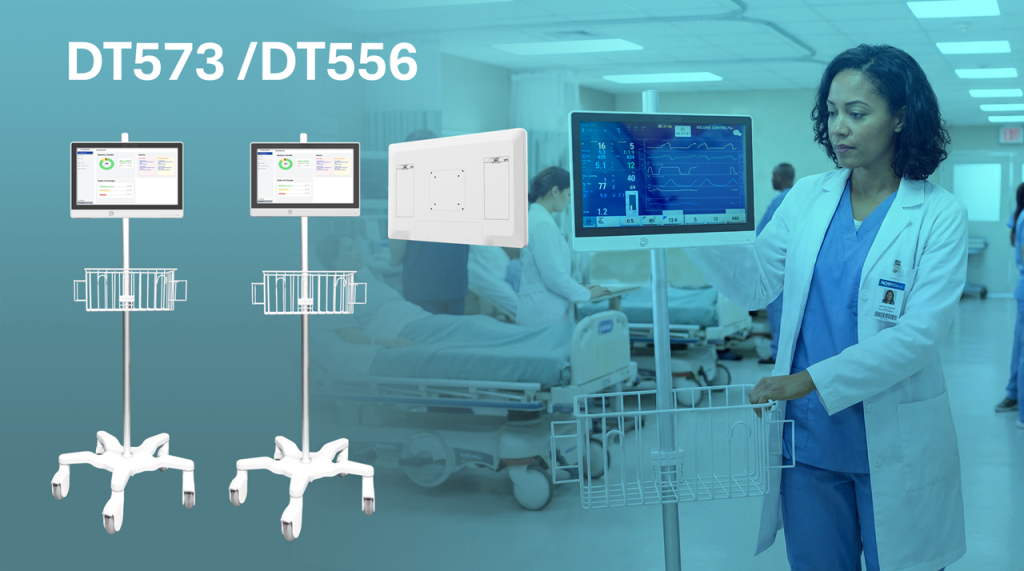
Standard medical carts are often bulky, and wall mounts can be restrictive. To provide greater flexibility across stick carts, wall mounts, and kiosks, DT Research introduced the all-new DT573 and DT556 Medical Computers.

These medical-grade all-in-one (AIO) computers are designed to bridge the gap between portable tablets and traditional, bulky medical workstations. These fanless systems prioritize mobility and infection control while minimizing tipping risks, making them optimized for deployment on slim carts and fixed installations such as patient rooms or telehealth kiosks. They are particularly distinguished by their rear-mounted, hot-swappable battery design, which ensures continuous 24/7 operation while leaving the top of the unit clear for clinical peripherals like 360-degree cameras or speakers.

Key Features of the DT573 and DT556

  • Display Sizes: The DT573 features a 17.3-inch high-resolution touchscreen, while the DT556 offers a more compact 15.6-inch display.
  • Continuous Power: Equipped with dual hot-swappable batteries that allow clinicians to exchange power packs without shutting down the system, eliminating downtime for charging.
  • Infection Control: Built with antimicrobial enclosures and a fanless architecture to prevent the circulation of airborne pathogens; the front bezel is IP65-rated for easy liquid disinfection.
  • High Performance: Uses the newest Intel Core Ultra or Qualcomm 6490 processors, giving it enough power for accessing electronic medical records, reviewing medical images, and handling complex telehealth tasks.
  • Peripheral Integration: Designed with a “clear top” to accommodate 360-degree cameras and large speakers, making them ideal for telehealth and real-time language translation.
  • Flexible Mounting: Fully VESA-compliant, allowing for easy attachment to wall mounts, articulated arms, or lightweight mobile carts.
  • Security & Authentication: Includes options for Imprivata-compatible dual-frequency RFID readers, IR cameras for facial recognition, and smart card/CAC readers to ensure HIPAA-compliant secure access.
  • Connectivity: Supports modern wireless standards, including Wi-Fi 6E/7 and 5G, ensuring stable data transfer for high-bandwidth medical tasks.

Solving the “Dead Battery” Battle

Hardware is only half of the picture. In a hospital setting, a mobile workstation is only as good as its last charge. Managing a fleet of hundreds of battery-powered devices has been a reactive manual process, resulting in “battery anxiety” for staff and unexpected downtime.

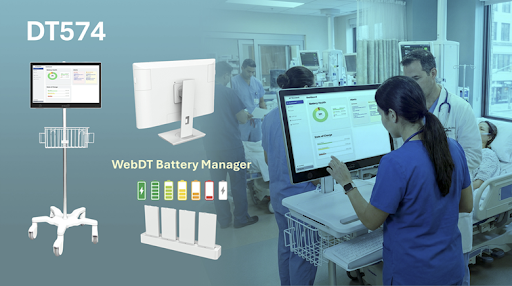
To solve this, DT Research developed the WebDT Battery Fleet Management Software. This isn’t just a monitoring tool; it’s a proactive command center.

With this software, IT departments can:

  • Monitor Health in Real-Time: Track the state of charge and overall health across hundreds of devices from a single dashboard.
  • Predictive Maintenance: Identify batteries that are nearing the end of their lifecycle before they fail during a shift.
  • Optimize Workflow: Ensure that every cart rolled out for a shift is fully powered and ready for duty.

By centralizing this data, hospitals can significantly reduce the total cost of ownership by extending battery life.

Why Form Factor and Fleet Intelligence Matter

Wider industry trends support the shift toward compact, battery-driven AIOs. Research into nursing workflows suggests that “technology-related interruptions,” such as hardware failure or power loss, significantly impact patient safety and clinician burnout.

By providing precision-engineered hardware like the DT574 and the software intelligence to back it up, we are removing the friction between the caregiver and the digital record.

The flexibility to move between a stick cart in a hallway and a wall mount in a patient room, without rebooting or losing power, allows for a more “human” interaction. The technology fades into the background, allowing the clinician to focus entirely on the patient.

Looking Ahead Post-HIMSS 2026

HIMSS 2026 proved that the future of healthcare is mobile, but that mobility must be sustainable. The introduction of the DT573, DT556, and DT574, paired with WebDT Battery Fleet Management Software, sets a new standard for what hospitals should expect from their technology partners.

At DT Research, we remain committed to engineering solutions that are as resilient as the professionals who use them. We aren’t just building computers; we are building the infrastructure for a more efficient, mobile, and responsive healthcare system.

For more information on our latest medical AIOs and fleet management solutions, view our official announcements on the DT573/DT556 release and the DT574 and WebDT Battery Fleet Manager.